 AI & automation
AI for bookkeeping prep: receipts, month-end and VAT period
AI can read the key details off a receipt, group them and tell you what is missing, so a month-end check can take about 20 minutes. It cannot be responsible for your books: you check the amounts, VAT and dates, and your tax adviser files. Used like that, AI prepares the month and the VAT period, and you keep the final say.

- Published
- Updated
- Reading time
- 6 min read
On this page
- What can AI read from a receipt, and what must you check?
- How does a 20-minute month-end look with AI?
- How do you prepare the VAT period (UStVA in Germany, UVA in Austria)?
- What does your tax adviser want from you?
- What about retention in Germany and Austria?
- How Backbone does it
- Frequently asked questions
AI reads a receipt in seconds: supplier, date, gross and net amount, VAT rate, invoice number. That's the boring part of bookkeeping, so let AI do it. Deciding stays with you. You check the amounts, the VAT and whether the receipt is complete, then your tax adviser books and files. Used like that, month-end takes about 20 minutes and the VAT period (UStVA in Germany, UVA in Austria) stops being a scramble.
What can AI read from a receipt, and what must you check?
Give an AI assistant a PDF or a photo and it can pull out the supplier, invoice number, date, amounts, VAT rate and currency. Claude accepts PDFs and images (JPEG, PNG, GIF, WebP), and small or low-resolution images can give weaker results (Anthropic help, as of 08/10/2026). So photograph receipts flat and sharp.
AI reads fast but makes mistakes. Check these every time:
| Check | Why |
|---|---|
| Gross, net and VAT add up | A misread digit looks perfectly plausible |
| VAT rate and country | 19 % or 7 % in Germany, 20 % or 10 % in Austria; foreign VAT is not input VAT |
| Supplier name, address, tax number or VAT ID | Required for input VAT; small invoices up to €250 (DE) or €400 (AT) need less |
| Date and invoice number | They decide the period and expose duplicates |
| Private or business | AI cannot know that the lunch was a client meeting |
Input VAT needs a proper invoice: § 15 (1) sentence 1 no. 1 UStG in Germany, § 12 (1) no. 1 UStG in Austria. If AI calls a receipt "complete", check it yourself anyway. A bank statement does not replace the invoice.
Don't paste receipts with personal data into just any AI tool. Check the data protection terms of your plan first.
How does a 20-minute month-end look with AI?
Example: Werkhaus Studio closes September on 3 October. The times are a sample, we didn't measure them.
- Upload (3 minutes). Statements and receipts for the month go into one place.
- Read (2 minutes). AI reads the receipts and proposes a match to each transaction.
- Review (8 minutes). You go through the list: confirm clear matches, correct the odd ones, mark transfers between your own accounts as not relevant.
- Chase (4 minutes). AI lists transactions without a receipt. You download the subscription invoice and ask the shop for the other one.
- Hand over (3 minutes). One folder for your tax adviser, plus a short list of open points. The handover checklist says what belongs in it.
The times assume you do it every month. After a year of neglect it takes an afternoon. The routine itself is described in A monthly receipt routine.
At the end, ask AI what is missing, what looks unusual (a double amount, a very high one, a new supplier) and which questions go to your adviser.
How do you prepare the VAT period (UStVA in Germany, UVA in Austria)?
AI doesn't file your VAT return. It gets everything the return needs on the table:
- Completeness. Is every invoice you issued and every receipt of the period there? Is the last statement closing balance the next opening balance?
- Special cases. Which transactions involve reverse charge, EU clients or foreign suppliers? These land in other fields and are easy to overlook.
- A plausibility sum. VAT on your sales minus input VAT is the amount to pay or get back. Let AI compute it, then compare it with your adviser's or your software's figure.
The dates differ:
| Germany (UStVA) | Austria (UVA) | |
|---|---|---|
| How often | Quarterly; monthly above €9,000 VAT in the previous year | Above €55,000 previous-year turnover: quarterly up to €100,000, monthly above |
| Due | 10th day after the period, one month later with a permanent extension | 15th of the second month after the period |
| Basis | § 18 (1), (2) UStG | § 21 (1), (2) UStG 1994 |
| Filing | ELSTER | FinanzOnline |
For Q3 2026 that is 12/10/2026 in Germany (the 10th is a Saturday) and 16/11/2026 in Austria (the 15th is a Sunday). Details and exceptions are in the guides on the VAT advance return in Germany and the Austrian UVA.
What does your tax adviser want from you?
The same four things every month, in a fixed order: invoices issued, receipts, bank statements for every account, and a list of open items. AI helps you write that last list and the questions in plain language.
Two things annoy advisers: AI-generated bookings presented as facts, and chat logs instead of documents. Hand over the original receipts and statements, plus your own review notes. If you want to use AI for suggested accounts or categories, ask your adviser first which they accept. Many work with fixed account plans and have their own checks.
What about retention in Germany and Austria?
Keep the originals in your own records, where you can find and read them at any time.
- Germany: invoices and accounting vouchers 8 years, books and annual accounts 10 years (§ 147 AO). Scanned copies are allowed if they match the original and stay readable; the GoBD ask you to describe your process. For e-invoices (XRechnung, ZUGFeRD) keep the XML data: that is the original.
- Austria: 7 years for books, records and vouchers (§ 132 BAO). Vouchers must be kept so that every entry can be checked (§ 131 (1) no. 5 BAO).
Both periods run from the end of the calendar year. See How long to keep invoices and receipts. Delete a file in the AI tool only after it is stored in your own records.
Why this one matters to us
My goal is to optimise and automate back-office tasks so that we founders can focus on what matters most.
Automating back-office work with AI agents and AI integrations is the future – that's why I built Backbone!
 LucaFounder, Backbone
How Backbone does it
Month-end in minutes. In the app, or in a chat with ChatGPT, Claude and many more.
 Receipts matched automatically
Upload the statement. Clear matches assign themselves.
In the chat Erste_Bank_10-2026.csvHere's the Erste Bank statement for October.
Backbone connectorupload_fileImported. Where receipt and payment clearly match, they're already matched:
- Bürobedarf Lindner KG · 14/10/2026 · −€86.90
- Café Morgenrot · 13/10/2026 · −€23.40
- Fotostudio Weiss · 09/10/2026 · −€350.00
- Druckerei Nordwerk GmbH · 02/10/2026 · −€149.00
In the app - Cash payments
Tap “Paid in cash?” and the receipt lands in the cash book.
In the chat Which cash payments need my OK?
Backbone connectormark_receipt_cash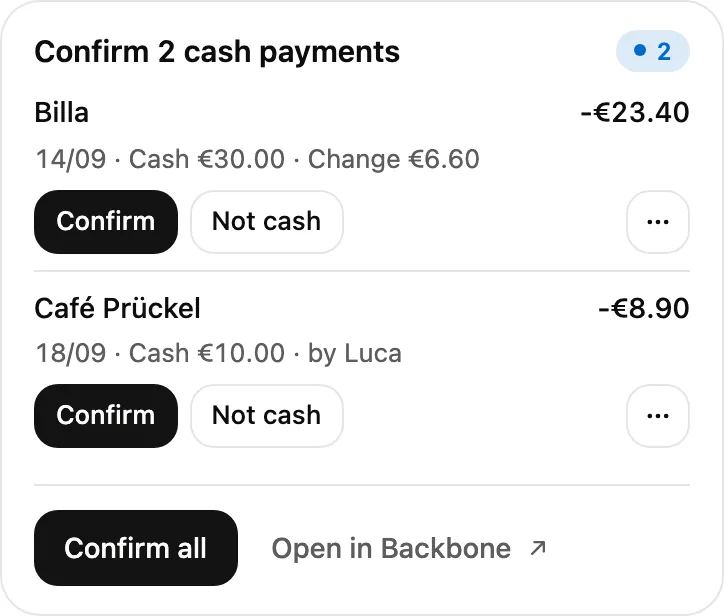
In the app - Off to your bookkeeper
Month complete. One link, done.
In the chat Send October to my tax adviser.
Backbone connectorsend_to_bookkeeperSend to bookkeeper- To
- Kanzlei Rehm & Partner[email protected]
- Period
- October 2026
- Contents
- 48 receipts · 2 statements
In the app - Duplicate receipts caught
Uploaded twice, booked once.
In the chat Lindner_Rechnung_R-2026-4471.pdfHere's the Lindner invoice from the email.
Backbone connectorupload_fileRead. It looks like a duplicate of an earlier receipt:
- Bürobedarf Lindner KG · 14/10/2026 · −€86.90 · already matched
In the app
Frequently asked questions
Can AI do my bookkeeping?
It can prepare it by reading receipts, suggesting matches and listing gaps. The responsibility for the books stays with you and your tax adviser, so you check every figure that ends up in them.
Can AI read receipts reliably?
Mostly, for clear PDFs and sharp photos. Misread digits, wrong VAT rates and unreadable thermal paper happen, so confirm amounts and VAT yourself.
Can AI file my UStVA or UVA?
No. It can list what is missing and compute a plausibility sum. You or your adviser file through ELSTER (DE) or FinanzOnline (AT).
Is it allowed to upload receipts to an AI chat?
Receipts contain business and sometimes personal data. Check the data protection terms and the data processing agreement of your plan before you upload them.
Do I still need my adviser?
Yes. AI makes the handover cleaner and shorter. Questions of tax treatment stay with your adviser.
How long do I keep receipts?
Eight years in Germany for vouchers, seven in Austria. See the retention guide.
Ease of mind. Every quarter.
Backbone reads your receipts, suggests the matching transaction and packs the month into one ZIP for your tax adviser. 7-day trial, card required.
General information, not legal or tax advice and no review of your case. Details on providers and laws can change. For your case, follow your tax adviser.
Sources: Anthropic help "Uploading files to Claude" (as of 08/10/2026) · § 18 (1) UStG · § 21 (1) UStG 1994 (RIS) · § 15 (1) sentence 1 no. 1 UStG · § 12 (1) no. 1 UStG 1994 (RIS) · § 14 (4) UStG · § 33 UStDV · § 11 (1), (6) UStG 1994 (RIS) · § 147 AO · § 132 BAO (RIS) · § 131 (1) BAO (RIS) · GoBD (BMF letter 28/11/2019, amended 14/07/2025)


